 Wire Goose
Free · macOS 12 or later · Apple silicon · Windows coming soon
Wire Goose monitors where apps send your data - within your home region or abroad - helping you verify their privacy claims under laws like GDPR (EEA) and CCPA (US).
Take control of your data with a firewall that asks before a new app sends anything.
Block or unblock apps anytime, and keep all your statistics saved.
See where your data goes
Switch between Location and Jurisdiction to see where your traffic goes and whose laws apply.

 Wire Goose
Search apps or countries
Server location
Operator jurisdiction
Data out
Data in
EEA, your home region
Operator jurisdiction: where the operator's parent company is headquartered
Traffic Totals
Updates with all filters. Currently showing the last 3 days selected above.
Sent 7.4 GBReceived 66 GB
Live
Showing right now
At a glance
See your latest destination, jurisdiction balance, and most active apps right from the menu bar.

Last sent toUnited StatesGoogle
Today, 74% of what you sent went to US-based operators.
Most active
BBrave BrowserUS 58%
TMicrosoft TeamsUS 96%
CChatGPTUS 100%
Open Wire Goose
Features
🔍 Real-Time Network Monitoring
- Monitor incoming and outgoing network traffic for every app and process.
- See exactly how much data each application sends and receives.
- Identify the companies and network operators receiving your data.
- Track network activity in real time, even when the main window is closed.
🌍 Interactive Global Network Map
- Visualize network connections on an animated world map.
- See which countries receive your data.
- Switch between Location (where servers are located) and Jurisdiction (where their operators are headquartered).
- Distinguish traffic within your home region, wherever you are (the whole EEA when you are in Europe), from traffic sent elsewhere.
🛡️ Privacy & Data Jurisdiction
- Understand where your data goes and which countries’ laws may apply.
- Investigate data transfers relevant to privacy regulations such as GDPR and CCPA.
- Identify applications communicating with companies outside your home region.
- Compare data transfers by country, company, and application.
📊 Network Statistics & History
- View real-time upload and download speeds.
- Explore historical network activity for the last 2 minutes, 10 minutes, hour, 5 hours, 24 hours, or 3 days.
- See which applications and companies receive the most data.
- Filter statistics by application, destination, and traffic volume.
- Store up to 30 days of network history locally.
⚙️ Customizable Monitoring
- Search, sort, and filter applications and network destinations.
- Customize the appearance, animations, and network activity indicators.
- Access live network statistics directly from the macOS menu bar.
- Choose between light and dark modes.
- Keep network history locally, without cloud uploads.
⭐ Wire Goose Pro — Paid Features
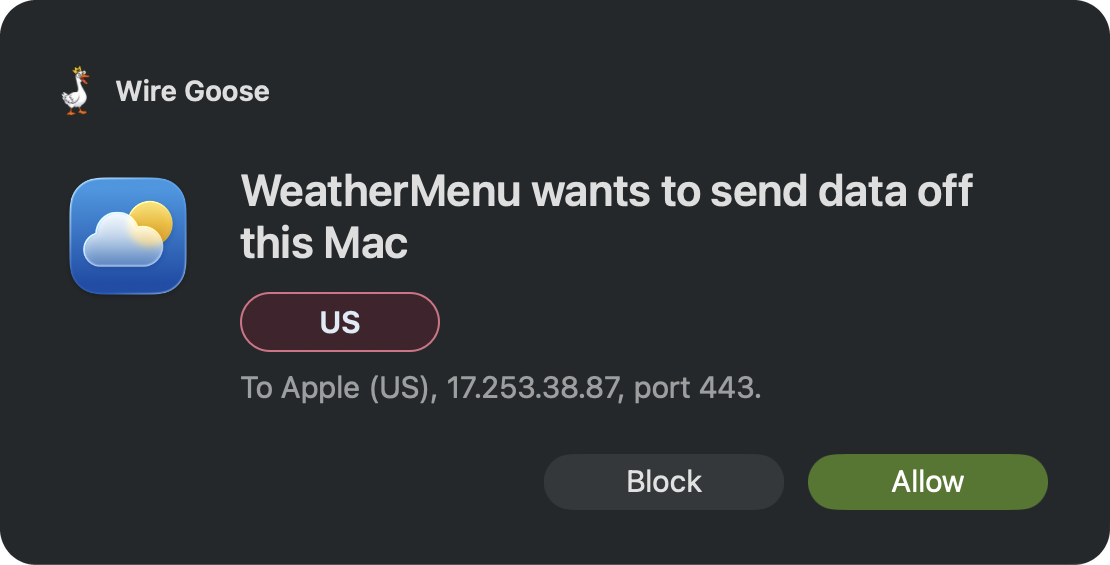
🚫 Application & Process Blocking
- Full WireWall functionality.
- Block individual applications and processes from accessing the network.
- Block outgoing and incoming connections separately: what an app opens, and what others open to it.
- Prevent blocked applications from sending or receiving data.
- Manage blocked applications and unblock them whenever you choose.
- Keep network restrictions active even after closing Wire Goose.
🔔 Real-Time Connection Control
- Receive interactive alerts when a new application attempts to connect, or something tries to connect to it.
- See the destination, network operator, and jurisdiction before deciding.
- Allow or Block the connection before data is transmitted.
- Configure automatic blocking of previously unknown applications.
📈 Advanced Statistics & Extended History
- Explore your complete saved network history, up to 30 days.
- Analyze network activity over longer periods to identify patterns.
- Switch between the interactive map and detailed, sortable country tables.
- Access historical data recorded before you bought Pro.
📤 Data Export & Reporting
- Export network activity and history to CSV.
- Export traffic statistics for individual applications.
- Export country-level network statistics.
- Copy application destinations for further investigation or reporting.
🛠️ Advanced Application Management
- Reveal applications and background processes in Finder.
- Quit or force-terminate applications directly from Wire Goose. (Direct-download version only.)
- Stop unwanted network activity without searching for processes manually.
Free · macOS 12 or later · Apple silicon
Windows version coming soon.